Dashboard Breakdowns
3D Modeling · 3D Printing · AI · Builds · CSS · DIY · Electronics · Experimental · Hardware · Home Automation · HTML · Raspberry Pi · Software · System Design
My home automation dashboard broke down in two ways this year. Hardware, then software. My wife and I really liked this dashboard. It saved us from pulling out our phones and getting sucked into emails or social media while we were supposed to be living our lives.
Both breakdowns ended up in rebuilds. The hardware obviously solved by 3D modeling and printing and the software part became another problem I would vibe code - no - vibe engineer - my way out of.
After rebuilding, it is totally different. But cooler perhaps? And everything it uses should last many decades this time, instead of just one decade.
Let me break it down for you:
The Build
Hardware
First breakdown: the screen finally died with one of the LED rows failing. It was a trooper. This meant updating to a new version of the screen
And the slight physical difference of the board components meant I had to redesign how I mounted it to the wall, from a complete enclosure that attached via mounting tape to a new slim set of custom brackets I made taking advantage of the standard screw mounts on the screen’s PCB:
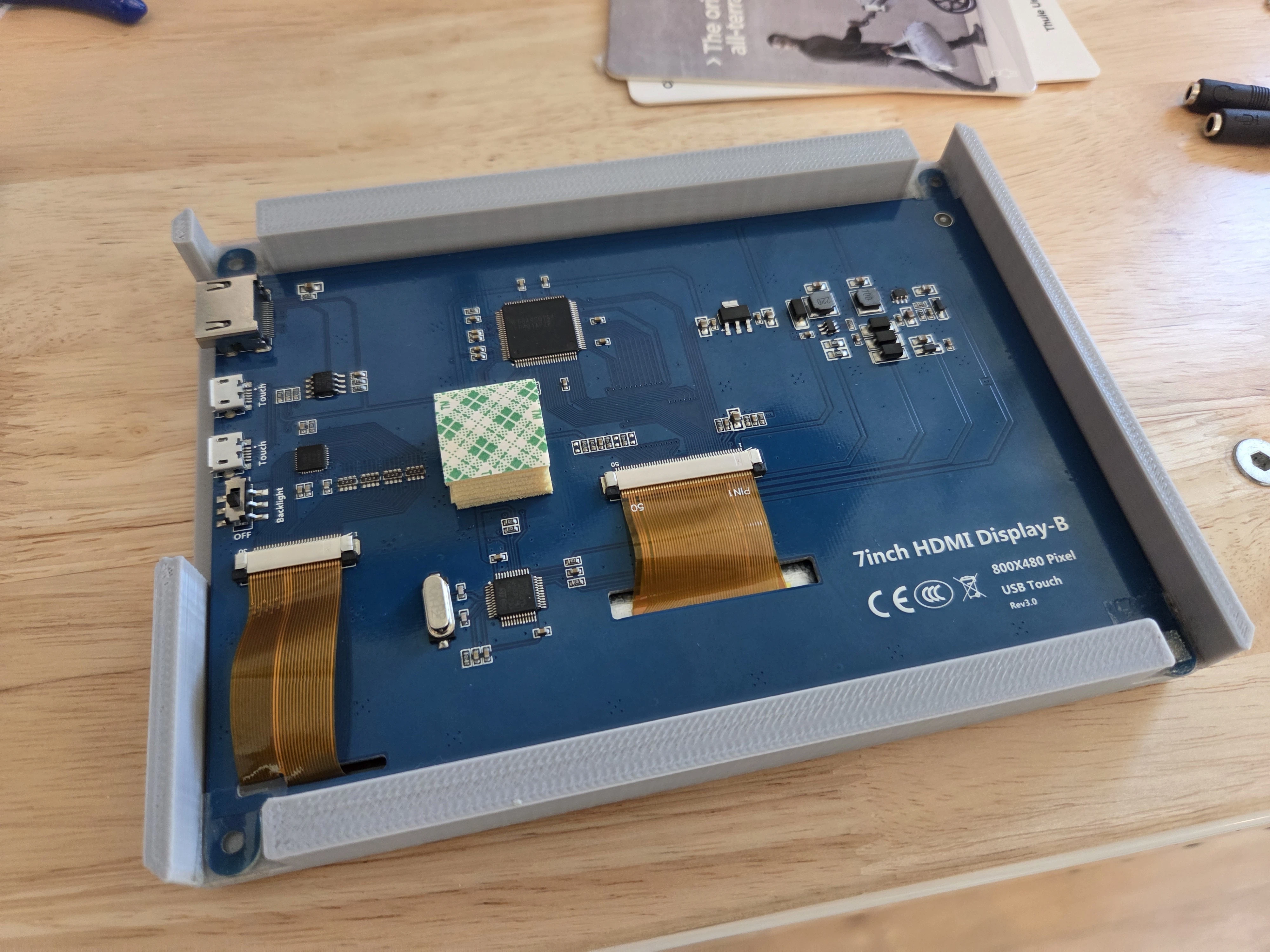
Old enclosure left, new mounts right (almost invisible in white like the wall). It’s much more secure, much less plastic and a good general purpose mount for raw PCB 7-inch displays. Printed in glossy white ABS to last forever and match the walls.
I posted them on Thingiverse here: https://www.thingiverse.com/thing:7226385
Software
Second breakdown: And the timing here was perfectly ironic - about a month after I got this new screen and made the slim mount, the software I was using to display the dashboard just gave up. That software was called ActionTiles and yes, that domain is gone because everything about the product disappeared about 20 days before I am posting this. The subreddit didn’t know what was happening but as best I can tell, it sounds like the solo developer unfortunately passed away several years ago.
Unfortunately ActionTiles was not open source for me to host it myself, nor does it seem worth the effort to integrate with the SmartThings API myself (I am considering moving to an open source home hub after lackluster support for SmartThings anyway), so my next course of action was to vibe code myself another dashboard. This one is less focused on home automation but equally useful to us.
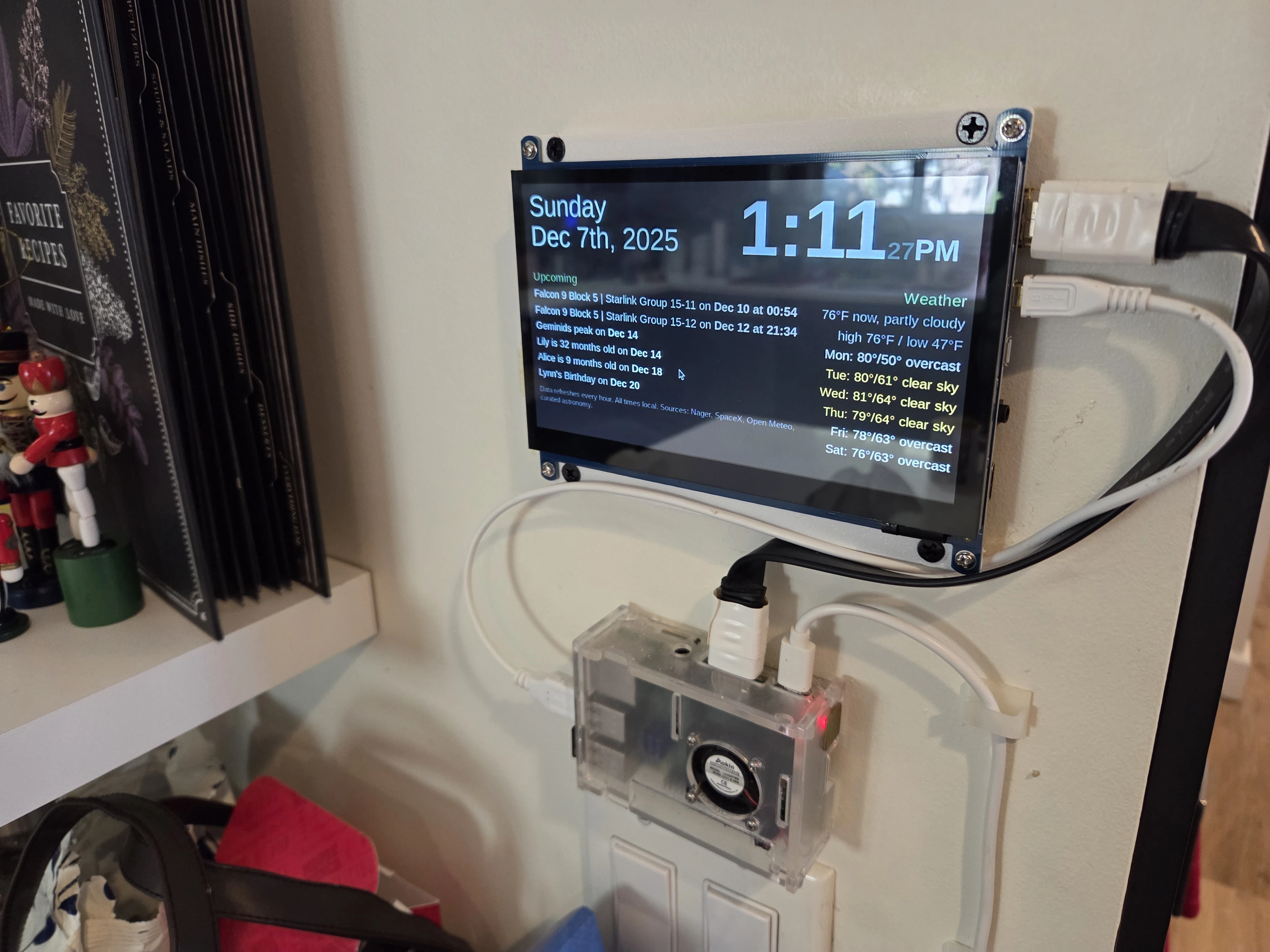
Over the course of some prompting and Codex PRs, the final result shows:
- The weather now and for the next week
- Upcoming birthdays on my wife’s and my shared birthday Google sheet
- How many months old baby Alice is
- Upcoming SpaceX launches visible from my house, with pulsing backgrounds an hour before each launch
- The time and date in a nice format
- Other astronomical events like meteor showers and eclipses
- Plus holidays and solstices
Here is the end result:
I was aiming for clean, simple, readable, and things Kaitlin and I were always looking at our phones to find out. It doesn’t do the same things as the previous dashboard but it reduces the number of times my phone has to come out even more than the previous one. We’ve been really enjoying it!
I learned some interesting things throughout this process:
- There are surprisingly good APIs out there for weather and forecasts despite the absolutely abysmal mobile weather app market
- Meteor showers don’t need an API because they happen the same time every year
- Eclipses basically don’t either cause you can just hard code out all the eclipse data with a few kilobytes of data for decades into the future
- The SpaceX upcoming launches list, despite being fully open and probably the simplest of all the data sets here to work with, was by far the most challenging for my AI assistant to read from. This is where the hosted AI coders fall down a lot: their environments simply are different than the ones we are using and they have a hard time accessing stuff that should be open. When they finally figure out how to do that, they have such short memories that they forget things like “only show launches from Vandenberg".
As with almost everything on this site, it’s totally open source and this one’s contained in a single ~1000-line html file. If you want, you can throw this into your favorite AI model and ask it to change it to events you care about and weather in your location.
Vibe Coding? Or Vibe Engineering?
Here is where I launch into another breakdown of AI software development. I feel the need to write about it every time I wrap another project, because it’s changing so quickly.
I used Codex, mostly, to build this dashboard. I like Codex because it makes more sense to me to have AI models make discrete code changes and pull-request them into my project rather than trying to work in the same IDE as the AI.
Every time I “vibe code” something new, I find new ways to be amazed and disappointed by these thinking machines. The main takeaway I had this time is, despite the amazing speed of development, I just can’t see anyone other than an engineer getting a workable software product out of these models in 2025.
This is why the term “vibe engineering” is growing on me. Now that the basic code writes itself, what I see engineers doing all day are things around the code like making sure environments work and making sure features don’t conflict. And, most key of all: determining the actual specific logic of the product. Check out the detail in my original prompt for this dashboard:
Please create a new dashboard at https://hockenworks.com/html/home-calendar.html.
It will function as a standalone servable page like https://hockenworks.com/html/agent-mode-solar-system-self-contained.html.
This is going to be permanently displayed on a small 16/9 touchscreen in our kitchen running on chromium on Raspberry Pi.
On the right part of the screen (a full square aligned with the left side of the 16 by 9 screen) will be a calendar. That calendar should display the current week and next 7 weeks on a 7 by seven grid, using your stylistic preferences to denote the dates and days of the week. Draw a bold line horizontally and vertically through month breaks with a clear delineation between the two.
This calendar should use public data which does not require any sign-in to fetch:
- All US Holidays
- First day of each season, dates when the time changes
- Special astronomical events like eclipses or visible meteor showers etc (list time of day for these ones, for example “Solar Eclipse at 2:11 PM” listed on its date
- SpaceX launches from Vandenberg ONLY
- Anything else you see fit to list here (let me know if you’ve added anything when you finish)
Come up with theme colors and icons for each foreseeable event (such as a clock for time change days, spaceship for launches, egg for Easter, etc, and fall back to just text for unknown events.
On the left half of the screen, full remaining width (to the left of the square calendar on the right) should be in this order:
Time in the format: 12:42 PM Date in the format: Nov 23rd
Both of these should have fun, randomized animated transitions. Use whatever html and css tricks you want to do this, just make sure it’s all self-contained code and libraries you can include in hockenworks so this thing never breaks.
Then have a few lines which list any upcoming holidays or events in the next 4 weeks verbally in the format: Solar Eclipse coming up next Tuesday, February 17th at 2:11 PM or Solar Eclipse coming up February 17th at 2:11 PM
You should use “this” and “next” for upcoming days of the week, or leave part that out if it’s further than 2 weeks out.
Do this on a black background with primarily white and light pastel colorings. New data such as holidays should be fetch hourly, if you need to decide on a frequency. Remember, this will be permanently displayed and always be up to date so account for any edge cases.
The combination of AIs really not being able to see yet and also being unable to test on the physical Raspberry Pi device which had some unique properties, Codex simply failed at the visual calendar. So I pivoted to a text-only dashboard.
But here is where I think the term vibe coding should become “vibe engineering.” Look at that prompt, which was still not nearly detailed enough to produce what I wanted. There were at least ten more prompts, several as long as that, after pivoting to a text-only dashboard to get it working well. This wasn’t to correct AI mistakes, but to get to the level of precision in what I actually wanted out of the dashboard. You have to be SO precise in your prompting to get what you want. Precise like an engineer, not an idea guy.
It’s much faster to have AI code for you than to write it yourself. But if you are spending this much time designing detailed logic and building up the knowledge of what is feasible and what isn’t, in my opinion, you’re an engineer.
The AI also lacks any touchpoints with the real world - in this case, my old chromium running on Raspberry Pi was not testable for the AI, and so I had to run back and forth from my office to the dashboard to see if things scaled correctly. This is not just a problem for niche projects like this. I have seen AI code not work on certain devices and browsers in “normal” web projects at work too, and fixing these things is what engineers do.
And then, potentially the most egregious consistent failure mode (and this really needs to be fixed): AI still loves to mock up fake data. This happened multiple times in this project where AI just started ignoring API calls and making up dates and times for things to happen. This tendency feels like the labs are trying to game benchmarks by making their software agents make plausible-looking successes that a human evaluator might miss and accidentally rate highly - but made up data is far, far worse for real world use, especially for non-engineers who are less likely to catch it.
Even with all of these problems preventing these models from “democratizing engineering” - they are still amazing tools. I would not have known where to start on many of these features without the AI simply knowing things I didn’t, like the open weather API and the method of accessing Google sheets as a CSV export. Even as an engineer, there’s no chance I would have whipped up a custom dashboard to do all this and solve my dashboardlessness before the era of AI.
These models are liars and cheats that are also blind, but somehow they’re still greatly expanding what it’s possible to build, and how fast we can build it. Just recognize that once you are building and running real software that actually fits your intentions, you are, effectively, an engineer.


 200
200