Fable could really 3D model
3D Modeling · AI · Bambulab X1 · Builds · Hardware · Invention · Openscad · Predictions · Singularity
When a new AI model comes out these days, I’m not usually holding my breath. They will improve benchmarks but nothing I am doing day-to-day is going to fundamentally change, most likely.
But I’ve been testing these foundation models’ abilities to create 3D models via OpenSCAD since the beginning of 2023. Last year I even designed an OpenSCAD MCP server to let the AI “check its own work” by visually rendering OpenSCAD code it writes and returning it images from various angles. That MCP process is how I’m getting the results I’m going to show you here.
None of the models impressed me until 2 months ago with the release of Claude Opus 4.7.
Opus 4.7
To me, prior to Opus 4.7 in April of 2026, spatial reasoning was one of the very obvious ways these models were not really intelligent.
Opus 4.7 suddenly went from getting only primitives and basic placements right to following complicated, well-described modeling instructions.
Let me show you some examples.
Opus 4.7: Rocking Chair Stool
This is my favorite AI-generated 3D object in my house yet. It’s a stool I made so that my short wife and my legs can use our too-high rocking chair. Again, fully described by me including dimensions, bevels, and screw placements. All I did was hit print, then prep the 2x4’s and assemble.
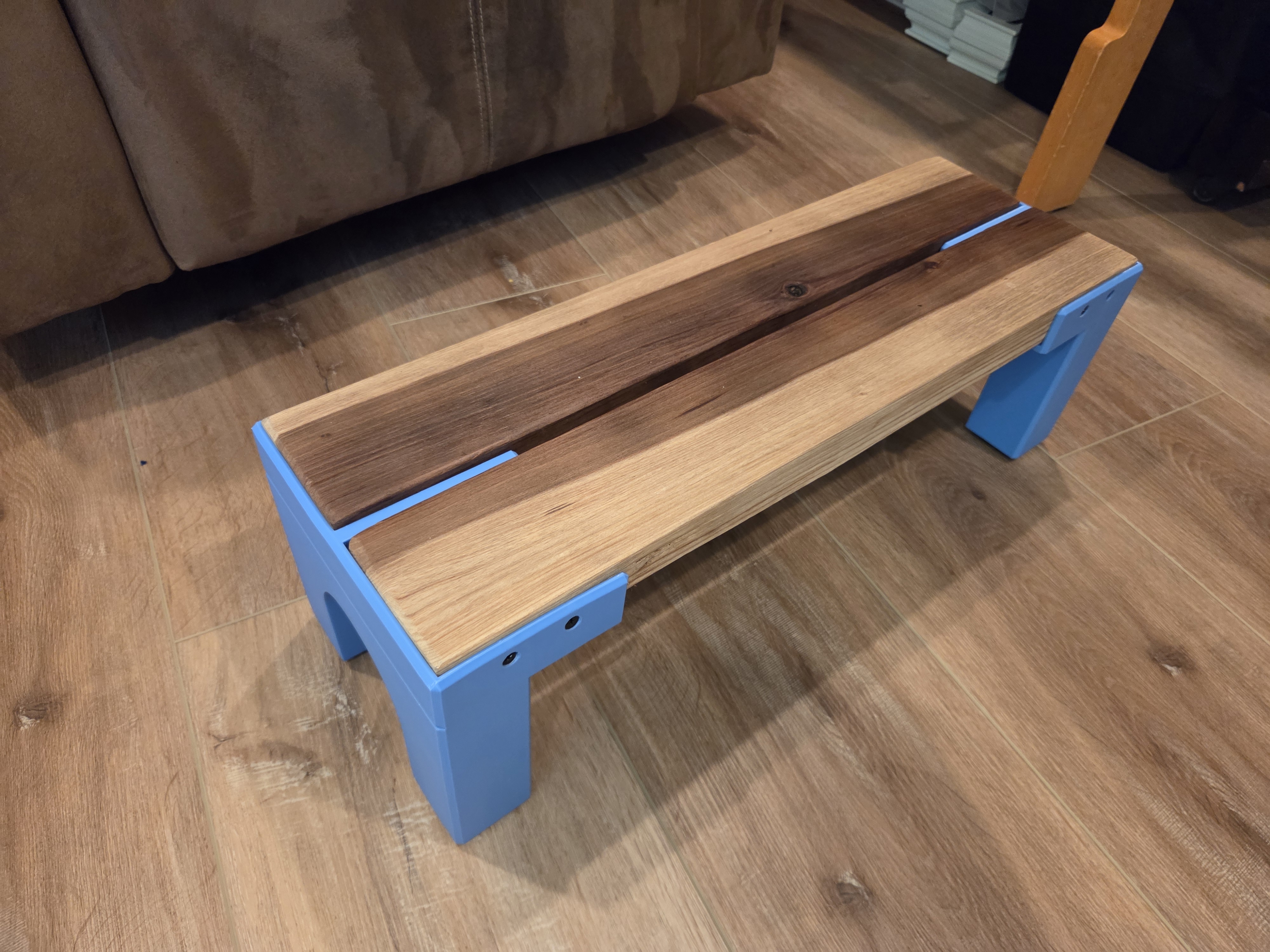
The thing is perfect and we use it every day. I printed it in “TPU for AMS” straight from the STL file Opus gave me with no modifications - it met my spec exactly.
But - I still designed it completely (using my words).
Opus 4.7: Baby Walking Practice Platform
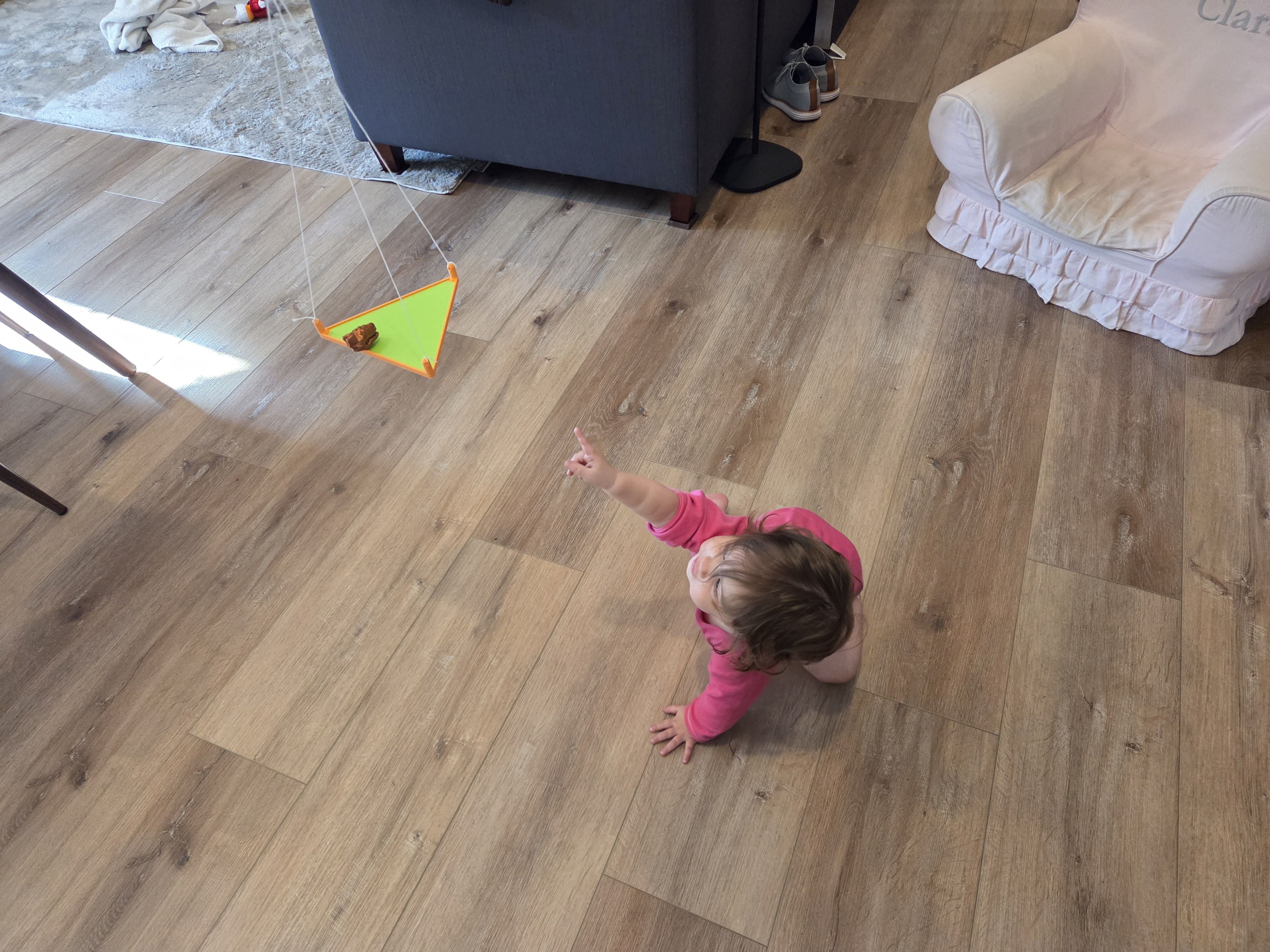
Here’s a platform I made to hang from the ceiling to hold toys so that Alice would be encouraged to walk over to them. I described the exact shape and dimensions I wanted for this part, and Opus 4.7 gave me the exact STL I described after just a couple edits.
Fable
Then Fable released. The first thing I tried was 3D modeling with my OpenSCAD MCP server, and then I spent my Fable credits on basically nothing else.
Though I only had it for 2 days on the $20/month plan, Fable blew me away with its ability to 3D model. For the first time, I saw an AI model creatively reason to create a 3D part rather than simply creating something fully specified.
Fable First Test: Toddler Floor Bed Shelf
I was blown away that this worked first try.
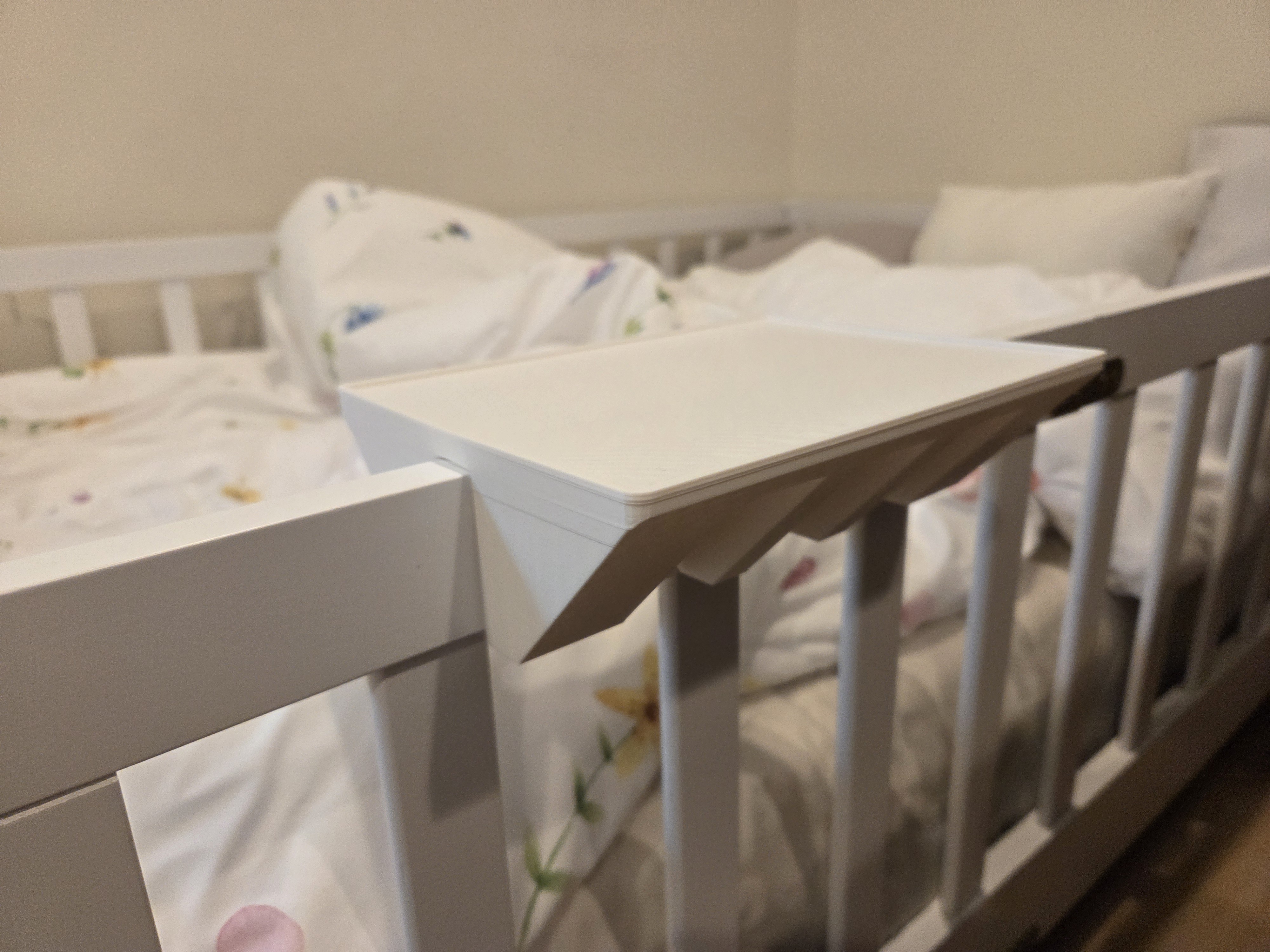
Here is a table Fable designed to snap onto the railing of Alice’s new floor bed, to hold books and a milk bottle at bedtime. The only thing I gave Fable here was the mission of creating a 6x8-in table with a lip, and the dimensions of the toddler bed’s rail and crossbars. It came up with the idea to place latching clips at a spacing apart such that two would always latch no matter where vertically it was placed along the bed rail. Very clever! And not just idea, it also translated that idea perfectly to a 3D model that I printed out and snapped onto the bed frame, which I’ve been using every night. During its process, it used my OpenSCAD server many times, and even went as far as to fully model out the bed rail itself to make sure this part would fit correctly around it, simulation style.
I didn’t really design a single thing about this. All I had was an idea:
Full prompt for this one:
Today I have an open-ended 3D modeling problem for you. I’m not going to give you the exact solution, but I am going to give you the dimensions you need and the target goal, and you’re going to need to be creative with the design.
We will be designing a shelf to hold my baby’s milk bottle and a book that will mount on top of one side of her toddler floor bed frame. I’ve attached a picture of that. The dimensions that you should be aware of are that the frame at the top is 19 mm thick, and the bars below them that you’ll probably use to clip or latch onto or something are 16 mm and 34 mm long. Between them is a distance of a little over 65 mm. The top bar, the one that is 19 mm thick, is 46 mm deep.
The shelf should sit centered on top of this bar and should be easy to attach such that it is held tight to the bar with no extra equipment if possible. I want it to be about 8 inches by 6 inches along the frame, about 4mm deep with a slight 2mm lip and four 5mm rounded corners.
Do your research and make this a 3D printable object with as minimal possible support, no support at all if possible
Use the openscad MCP renderer to check your work each step and then return to me the final design as an STL file.
I gave Opus the exact same prompt and it failed in predictable ways: it got the orientation of the rail wrong even though I gave it a picture with my prompt, and its latching mechanism didn’t make much sense. Fable is the real deal when it comes to spatial reasoning.
Fable: A Gift Box with Vector Graphics
I needed a gift box for some nice chocolate I got my Mom for her birthday. Similar story here. All I gave Fable were the interior dimensions of the box, that I needed the top to pressure-fit to the bottom, the text I wanted, and then as a second pass some “art” - the balloons and stars you see.
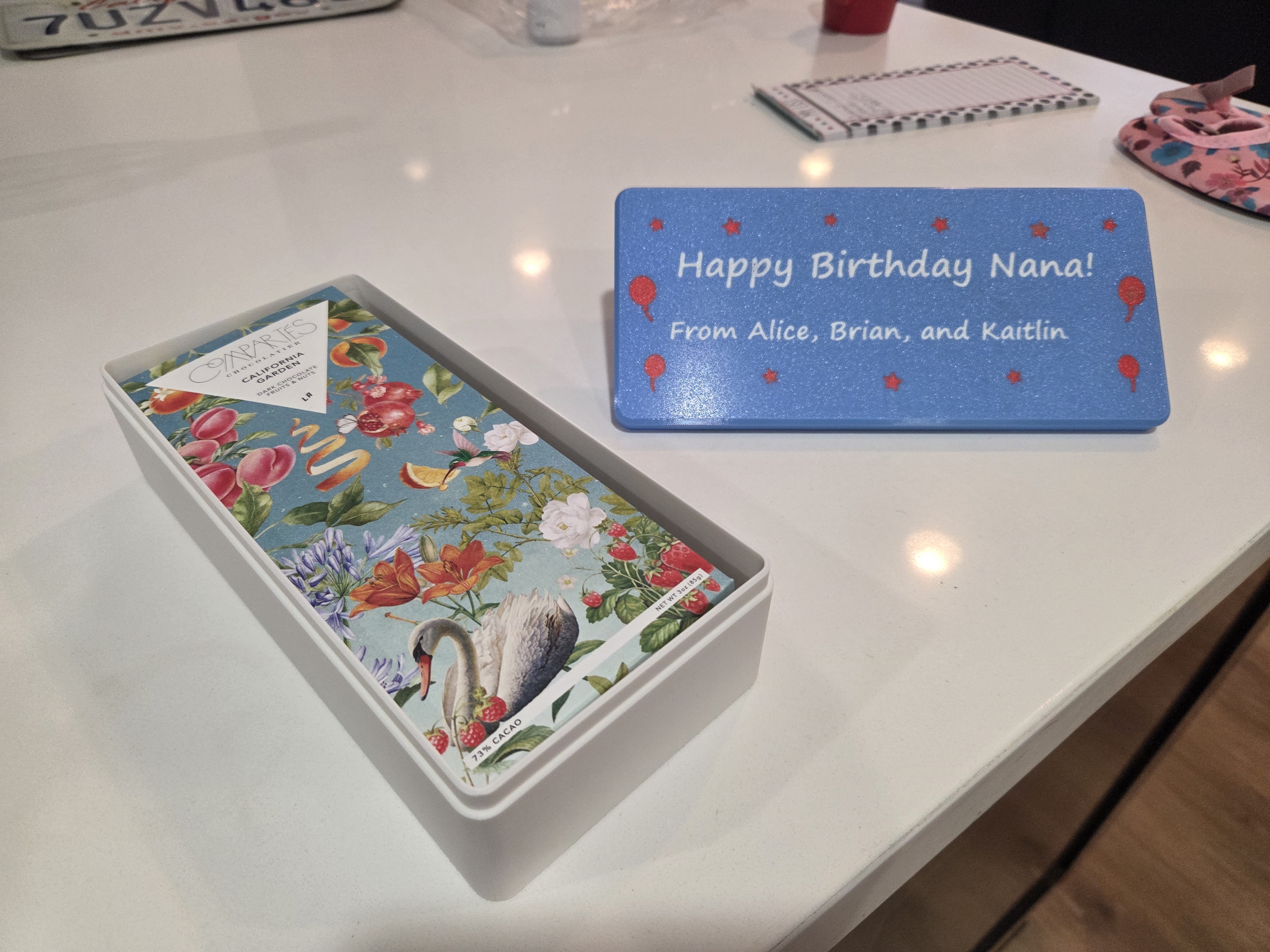
Because this is a multi-color model, I asked it to see if it could convert the final STL file (which is just the triangles representing the 3D shape of an object) to a .3mf file compatible with my printer that also contains color information. It failed this task twice, upon which I showed it the error message, and then it got it working! I honestly still don’t know how it converted the file. I don’t know much about .3mf files, actually. All I had to do before printing was pick the plastic filament to represent each color!
Fable: 3D models for games
By this point I was getting confident of Fable’s abilities. I decided to test something even more complicated and creative: 3D game assets!
I was still midway through this effort when the Fable ban hammer came down from the federal government. I got as far as Fable creating a couple of 3D models in a mechanical cel-shaded style that I made a pretty comprehensive skill.md file for. Fable did a surprisingly good job keeping scale and theme consistent. Here’s a pic out of the three.js-based art showcase dashboard I had it make for me as well, to try and match the display of how these assets would look in a game engine.
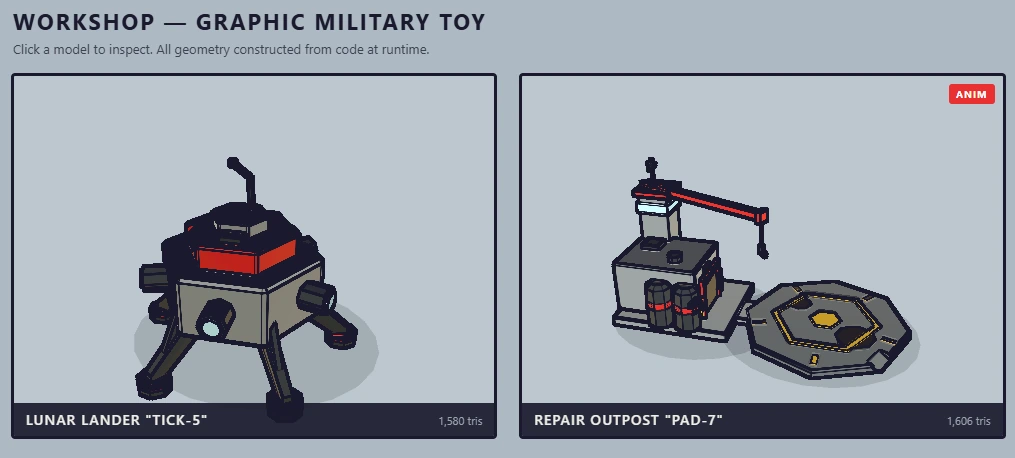
Not perfect but surprisingly coherent. I wish I had been able to produce a few dozen models and really refine that skill. I’ll have to wait until the US decides this model is safe or someone makes a better one.
Where are we?
Though several models after Opus 4.7 can reasonably follow precise 3D model instructions, I have never before seen this. I’ve never seen a model creatively reason about a complicated physical part and then get the model right.
I’m not sure what AGI is anymore. We might have been there before Fable, depending on your definition. But, I am starting to suspect there is no plateau. As far as I can tell, Fable is a leap beyond models that came out just a few months ago. I am testing this in a domain I know well, and it’s surprising me - unlike the AI reality of two years ago where AI was only “surprising” when you tested it on something out of your own expertise.
So anyway, there goes my backup plan.


 200
200